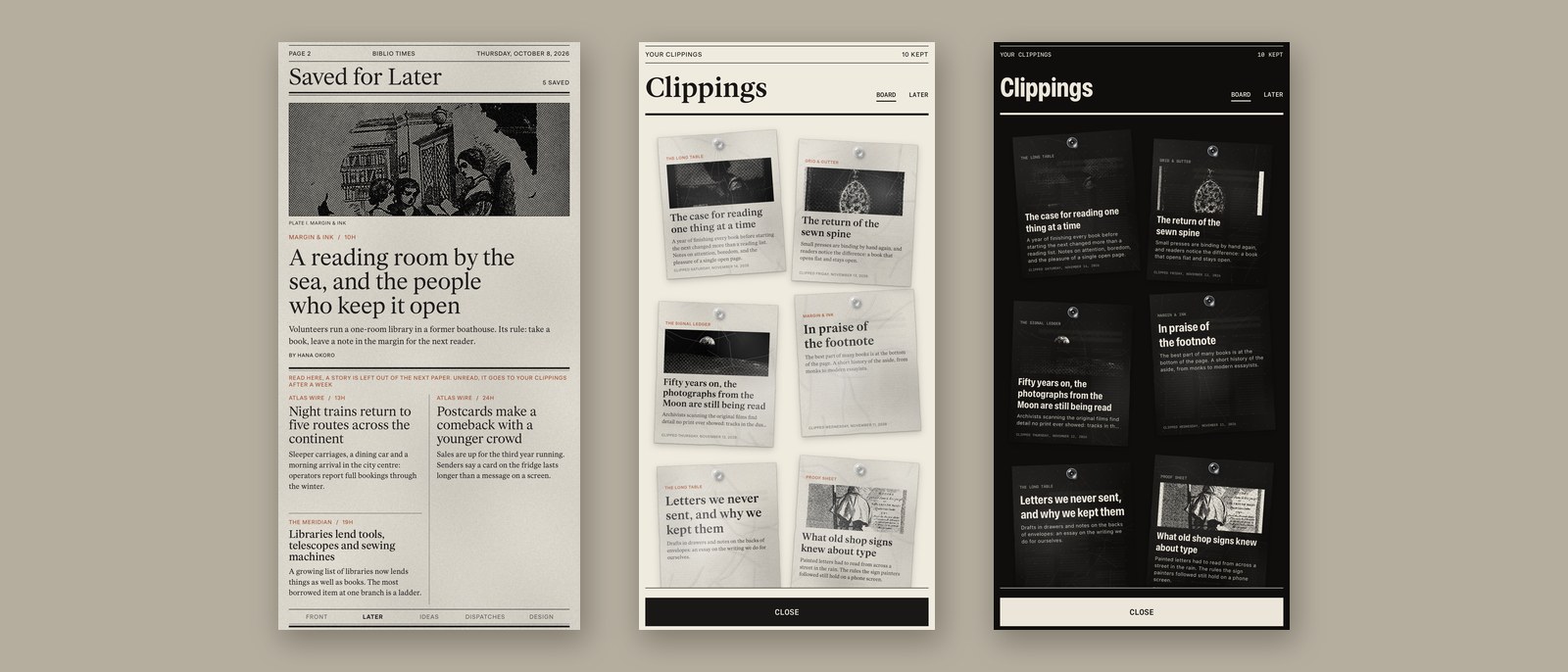
A reader wrote to tell us that a read-it-later list grows faster than anyone reads it. Biblio Times 1.7 is our answer. A story you mean to read is printed in your next paper, and a story you want to keep is pinned to a board of your own.
On a story's page, press Later. The story prints on a page of its own, Saved for Later, in your next paper. Read it there and the paper after leaves it off. Left unread, it leaves the page after a week, and you can still find it for a month under Clippings, in Later. On a keyboard, Command-L saves a story for later.
Your clippings are now cut-outs pinned to a board, each set in your edition's type, with its photograph if it has one. Hold one and drag it where you like, or let go of it to read it, straighten it, share it or take it down. On iPhone and iPad, turn it with two fingers; on the Mac, Control-click a clipping. Where you pin them follows you to your other devices.
On the Digital edition, the front page and every section now run on below the fold. Once you have opened the fold, drag up again for the next screen, for as long as the stories go.
Also in this edition: in a magazine, Back to the contents at the end of the last story turns to the contents, and Next in this issue at the end of the first story turns on to the second feature. A daily magazine's new issue is offered on its slip without a refresh. And on the Biblio and Dystopian editions, a page curls under your finger only when you take it by its edge, as you would a sheet of paper; a stroke across the middle turns the page when you let go. A reader told us a curl from the middle of the page did not feel natural, and we agree.
Later and the board come with the paper; there is nothing new to buy. Biblio Times 1.7 is with Apple for review, and will be on the App Store for iPhone, iPad and Mac once it is through. More about the paper at biblio.ink/times.
Please enjoy your news.
The editor